Ukraine’s State Cybersecurity Authority Recommends FIDO2 and Passkeys: What It Means for Business MFA
Multi-factor authentication has long stopped being something unusual. For corporate email, cloud services, VPNs, GitLab, and administrative accounts, requiring an additional authentication factor is now considered standard security practice.
However, simply having a second factor does not necessarily mean that an account is well protected against modern phishing attacks. This is exactly what Ukraine’s State Service of Special Communications and Information Protection emphasizes in its recommendations on digital identity security.
The agency recommends that government institutions, businesses, and users move toward phishing-resistant multi-factor authentication. The technologies specifically mentioned include FIDO2, WebAuthn, Passkeys, hardware security keys, and platform-based biometric authentication.
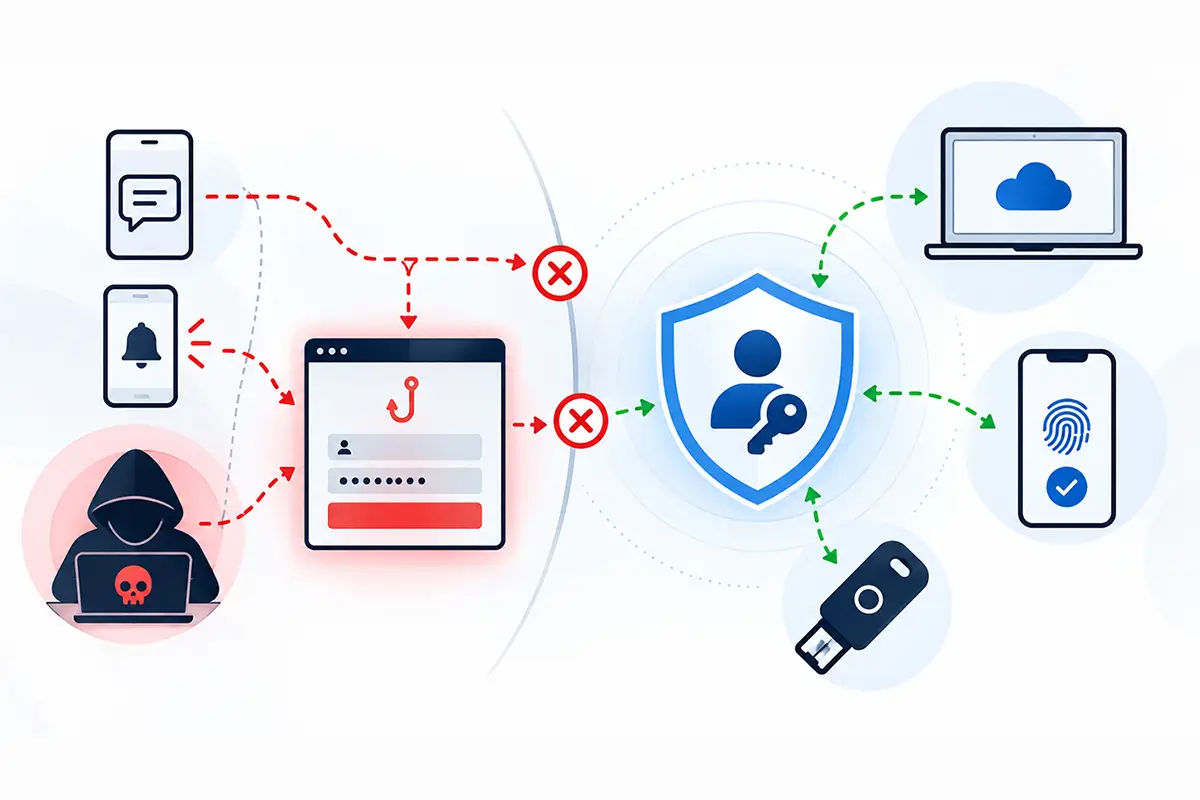
Phishing-Resistant MFA
The question is no longer simply whether a second factor exists, but whether users can accidentally hand that factor to an attacker through a fake login page.
FIDO2 and Passkeys
Cryptographic credentials are bound to the legitimate service, so a phishing website cannot obtain a reusable secret for authentication.
SMS Is Not the End Goal
The recommendations call for limiting SMS and voice OTP where possible and moving toward TOTP, Passkeys, or hardware authenticators.
the recommendations were published on the official website of the Cabinet of Ministers of Ukraine —
Digital Identity Security: State Service of Special Communications Recommends Moving to Phishing-Resistant Multi-Factor Authentication
.
Why Traditional MFA May No Longer Be Enough
The traditional two-factor authentication model is familiar: a user enters a password, receives an SMS or a code from an authenticator app, confirms it, and gains access. Compared with password-only authentication, this provides a significant improvement in security.
If a password is exposed through a data breach, malware, or password reuse across multiple services, an additional factor can often stop the attacker.
The problem is that modern phishing increasingly works differently. An attacker does not necessarily steal a password and use it later. Instead, the attacker may remain between the user and the legitimate service during the authentication process itself.
In an Adversary-in-the-Middle (AitM) attack, the user is redirected to a highly convincing copy of a legitimate service. The victim enters a password and one-time code, while a phishing proxy forwards those credentials to the real service in real time. Once authentication succeeds, the attacker may obtain a session token and hijack an already authenticated session.
We explain this type of attack and the available countermeasures in more detail on our
Phishing Protection for Business
page.
From a technical perspective, MFA may have worked exactly as designed: the password was correct and the second factor was correct. But the system was unable to prevent the user from authenticating through an attacker-controlled intermediary.
This is why the focus is gradually shifting from simply having multiple factors toward making the authentication mechanism itself resistant to phishing.
SMS and SIM Swapping
A phone number can be compromised through fraudulent SIM replacement or other attacks on the mobile communication channel.
AitM Attacks
A phishing proxy can relay a password and OTP to the legitimate service in real time and then capture an authenticated session.
MFA Fatigue
Repeated push notifications can pressure users into approving an unauthorized login simply to make the requests stop.
Weak Account Recovery
Even strong FIDO2 authentication can be undermined if help desk staff can easily reset the factor through a weak recovery process.
Why SMS Is No Longer Enough for Critical Accounts
For many years, SMS was one of the most widely used methods of two-factor authentication. The reason is obvious: users do not need to install a dedicated application or purchase a special device, and almost any mobile phone can receive a verification code.
That convenience comes with important limitations. The Ukrainian cybersecurity authority highlights risks such as SMS interception, fraudulent SIM replacement — commonly known as SIM swapping — and social engineering.
Modern phishing does not even require attackers to intercept the message. If the user receives a legitimate OTP and voluntarily enters it into a phishing website, the attacker can immediately relay that code to the real service.
An SMS code should therefore still be considered much stronger than a password alone, but it should not be considered a fully phishing-resistant authentication mechanism.
We discussed these limitations separately in
Why SMS Codes Are No Longer Enough to Protect Business Accounts
. The new recommendations from Ukraine’s State Service of Special Communications reinforce the same direction at the level of national cybersecurity guidance.
MFA Fatigue: When Users Are Pressured into Approving an Attack
Another important risk is associated with push-based authentication.
If an attacker already knows the user’s password, they may repeatedly attempt to sign in. Each attempt generates another approval request on the employee’s phone.
The first few requests will usually be rejected. But if notifications keep appearing dozens of times, the user may eventually press “Approve” by mistake or simply assume that the authentication application is malfunctioning.
This technique is known as MFA Fatigue or Push Bombing, and it is also identified as a risk associated with traditional MFA.
The scenario illustrates a broader issue: in many authentication systems, the second factor still depends on an action that an attacker may be able to persuade the user to perform. This is closely related to the techniques described in our article
Protection Against Social Engineering: Why Technology Alone Is Not Enough
.
Why FIDO2 Works Differently
FIDO2 differs from passwords, SMS codes, and one-time passwords not simply in the way users confirm a login. The underlying authentication model is fundamentally different.
When a FIDO2 authenticator is registered, a cryptographic key pair is created. The public key is provided to the service, while the private key remains under the user’s control — for example, inside a protected hardware token, smart card, or other authenticator.
During sign-in, the server sends a cryptographic challenge. The authenticator uses the private key to approve that challenge, but the private key itself is never transmitted.
Even more importantly, FIDO2 and WebAuthn bind credentials to a specific service. If a user opens a fraudulent website, the authenticator can detect that the domain does not match the service for which the credential was created.
As a result, security no longer depends entirely on the user’s ability to notice a slightly misspelled domain name or identify a convincing copy of a login page.
AitM Attack: Traditional MFA vs FIDO2
The important difference is not simply whether a second factor exists, but whether the phishing site can obtain authentication data that remains usable against the legitimate service.
Password + OTP
The user sees a convincing copy of the legitimate corporate service.
The user voluntarily enters valid authentication data into the phishing site.
The proxy forwards the credentials to the legitimate service and may capture the authenticated session cookie.
FIDO2 / Passkey
Credentials are cryptographically bound to the legitimate service.
The authenticator performs the cryptographic operation locally.
A credential created for the legitimate service cannot simply be reused on another domain.
“Implement phishing-resistant authentication.”
— recommendation of Ukraine’s State Service of Special Communications for protecting critical work and personal accounts.
Source
Passkeys Are Not Just a New Type of Password
Passkeys are sometimes misunderstood as a more modern form of password. The underlying principle is completely different.
A password is a secret known by the user and verified by the service. A Passkey is a cryptographic credential in which the private key remains under the control of the user or their trusted device.
Access to that key may be approved locally through a PIN, fingerprint, Face ID, Windows Hello, or another verification method.
This means there is no six-digit “Passkey code” that a user can copy into a phishing website and accidentally hand over to an attacker.
We explain the principles behind FIDO2, WebAuthn, and Passkeys in more detail in
Passwordless Authentication: Why Businesses Are Moving Away from Passwords
.
Why Hardware FIDO2 Keys Are Especially Relevant for Business
For individual users, a synchronized Passkey stored on a smartphone or computer can be a very convenient solution.
In an enterprise environment, however, convenience is only part of the requirement. Organizations also need control.
A company needs to understand where credentials are stored, who physically controls the authenticator, what happens when an employee leaves, and how quickly access can be revoked.
This is why hardware security keys are specifically relevant for administrators, executives, finance teams, DevOps engineers, and other users with privileged access.
A hardware FIDO2 authenticator provides a predictable lifecycle: the device can be issued to an employee, registered with approved systems, used throughout employment, and later revoked or returned when responsibilities change.
In this model, the FIDO2 key is more than simply another authentication factor. It becomes part of a managed corporate digital identity.
Hardware implementations and enterprise use cases are explained in more detail in
Hardware Security Tokens for Electronic Signatures and FIDO2 Authentication
.
The Migration Does Not Have to Happen Overnight
Real corporate infrastructure almost always contains systems from different generations.
One service may already support Passkeys, another WebAuthn, a third TOTP, while a legacy application may still depend on passwords and SMS. Replacing every authentication method at once is therefore unrealistic for most organizations.
A more practical approach is to gradually remove the weakest mechanisms.
Where FIDO2 or Passkeys are already supported, organizations can begin with high-risk users. Where that is not yet possible, replacing SMS with TOTP or a stronger push authentication flow may still provide a meaningful improvement.
There is no need to wait until the entire infrastructure becomes perfectly compatible with Passwordless Authentication. Security can be strengthened step by step.
Number Matching as an Intermediate Step
If an organization uses push authentication through a mobile authenticator but is not yet ready to move to FIDO2, Number Matching can be a useful intermediate measure.
In this model, a number appears on the computer screen and the user must enter the same number in the mobile authentication application.
The change may seem small, but it significantly reduces the effectiveness of Push Bombing. The user can no longer approve another notification automatically. They must see an active login attempt on another device and confirm that specific attempt.
The Ukrainian cybersecurity authority specifically recommends Number Matching as a way to reduce the risk of MFA Fatigue.
Weak Account Recovery Can Undermine Strong MFA
Even the strongest authentication provides limited value if the account recovery process remains weak.
An organization may issue hardware FIDO2 keys, disable SMS, and configure Conditional Access, but if an attacker can persuade the help desk to reset MFA through a simple phone call, the overall security model quickly breaks down.
This is why account recovery deserves the same attention as sign-in itself. Recovery should not rely solely on basic personal information, secret questions, or other details that can be discovered or obtained through social engineering.
For businesses, this means that implementing strong MFA must include clear answers to practical questions: who is authorized to reset an authentication factor, how an employee’s identity is verified, what happens when a hardware token is lost, and how a replacement authenticator is registered.
These processes may be less visible than a modern FIDO2 device, but they often determine the real security of the entire authentication architecture.
Sign-In Context Matters Too
Another important direction is adaptive or conditional access.
Not every sign-in attempt carries the same level of risk. An employee signing in during normal working hours from a known corporate laptop and trusted network represents one scenario. The same account attempting to authenticate at 3 a.m. from a new device in another country represents a very different risk profile.
Modern access systems can therefore consider not only authentication factors, but also device state, location, compliance with corporate policies, and unusual behavior.
This gradually changes the access control model. Instead of simply applying the rule “two factors were entered correctly, therefore access is allowed,” the system can evaluate who is signing in, from which device, and under what conditions.
This approach closely aligns with Zero Trust principles, where successful authentication does not automatically create unlimited trust for every subsequent action.
Where Should Businesses Start?
Most companies do not need to purchase hardware security keys for every employee immediately.
A more rational first step is to inventory current authentication methods. Organizations should determine where password-only access still exists, where passwords are combined with SMS, where push authentication is used without Number Matching, and which systems already support FIDO2 or Passkeys.
The next step is to identify accounts where compromise would create the greatest business impact. These typically include administrators, corporate email accounts, executives, finance teams, DevOps infrastructure, VPN access, cloud platforms, and systems containing confidential information.
These users are usually the best candidates for the first stage of phishing-resistant authentication deployment.
Audit Authentication Methods
Identify where the organization still uses password-only access, SMS, TOTP, push approval, FIDO2, or Passkeys.
Identify Critical Roles
Prioritize administrators, executives, finance teams, DevOps personnel, and users with access to sensitive or critical data.
Remove the Weakest Methods
Where possible, move away from SMS and voice OTP. If FIDO2 is not yet available, consider TOTP or Number Matching as an intermediate step.
Secure Account Recovery
Define procedures for lost tokens, device replacement, MFA reset, and identity verification during account recovery.
Gradually Deploy FIDO2
After testing phishing-resistant authentication with critical users, expand the model to additional employee groups.
The broader principles of enterprise MFA, authentication factor selection, and implementation scenarios are described on our
Multi-Factor Authentication (MFA) and Two-Factor Authentication (2FA) for Business
page.
From “Enable MFA” to Building the Right Authentication Architecture
A few years ago, “enable two-factor authentication” was already good security advice on its own.
Today, that recommendation is no longer specific enough.
SMS is still far better than a password alone. TOTP provides stronger protection in many scenarios. Number Matching reduces the risk of Push Bombing. But for critical accounts that need protection against modern phishing attacks, the logical next step is FIDO2, WebAuthn, Passkeys, and hardware authenticators.
This is the direction reflected in the recommendations from Ukraine’s State Service of Special Communications: reduce dependence on weaker phone-based methods, move toward phishing-resistant MFA, protect recovery procedures, and consider the context of each login.
This does not mean that SMS will disappear tomorrow or that every company must immediately migrate its entire infrastructure to Passwordless Authentication. The more important change is in how strong authentication itself is being defined.
Authentication should be designed so that users cannot hand reusable authentication data to an attacker even if they are convinced by a phishing website.
This is the key advantage of FIDO2 and Passkeys: security gradually moves away from relying entirely on human vigilance and toward cryptography and properly designed access architecture.
Phishing-resistant MFA
Need to Assess the Security of Your Corporate Authentication?
Smart Lab can help identify weaknesses in your current MFA architecture, prioritize critical accounts, and design a practical migration path toward FIDO2, Passkeys, and hardware authenticators.